Tuesday, January 28, 2020

Technique Tuesday - Featuring Stickles

Hi all,
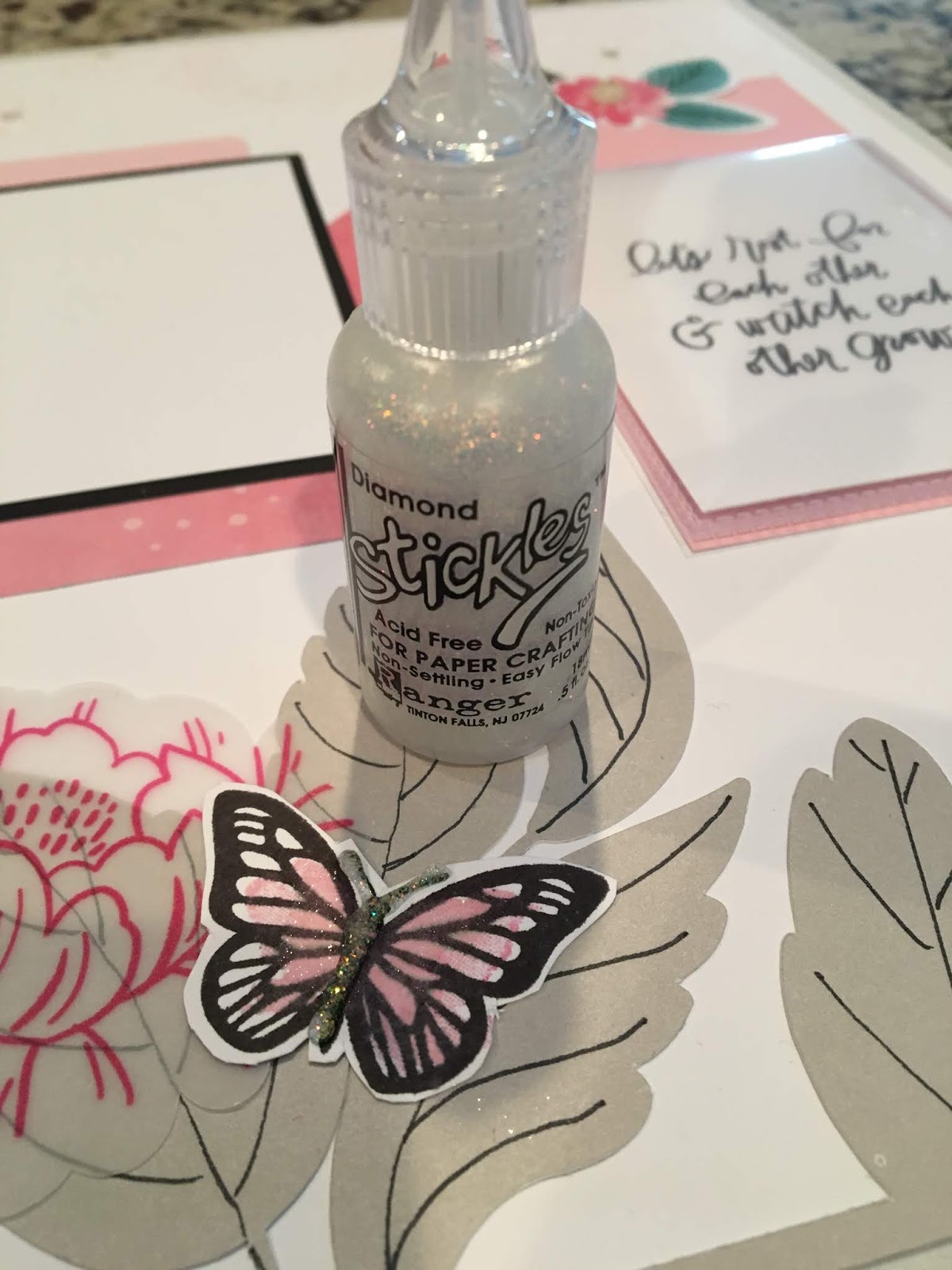
Today for Technique Tuesday I would like to feature one of the techniques used at the CTMH album retreat.  We stamped butterflies for a number of the layouts.  I wanted to make my butterflies pop off the page so first I folded the wings up, then I added foam adhesive behind the wings.

 I really like the way it made the butterfly wings pop off the page.
Next I added stickles.  I love Stickles.  The thing is I could never figure out why anyone would want black stickles.  Now I know.  I used Diamond Stickles Glitter Gel (pictured below) on these butterflies.
 Yes, I love the look but next time I would use Black Diamond Stickles Glitter Gel.

Contact me if you would be interested in making springtime scrapbook layouts or cards featuring butterflies.  LOL, I know it is not even February....I am betting the ground hog is going to go for an early spring!!

Have a wonderfully crafty day. 
Hope you come back Thursday for Throwback Thursday!! 
Tina


Friday, January 3, 2020

Finish It Friday - 2019 December Daily Album.

Hi all,
My goal for the day is to finish my base pages for my 2019 December Daily Album.  I started by photos taking on Dec 1 and focused on the photos during the month of December. I wanted to keep it simple during the holiday season.

Now I need to actually finish with my 2019 December Daily Album. I have broken it into chunks to make my project a little more managable.


  1. Pull together all my base pages into the album (plan to finish today for Finish it Friday)
  2.  My plan for Sunday is to print all the photos 
  3.  As soon as my photos arrive I plan a Make it Monday to insert photos and go crazy with dots, glitter and other emblishments.
Catch me at the end of day when I hope to post some photos and a short video showing my base pages.

Have a wonderfully crafty day and check back soon to see progress on the 2019 December Daily Album!

If you made a Decmber Daily album, leave a comment below as I would love to see your craftiness!


Thursday, January 2, 2020

New Year, New Goals

Hi all!

If you are like most people, you are setting yourself goals of 2020.  I am like most people in that I am setting my goals for the year.  Like most people I set health, weight, and exercise goals for the new year.  I also set crafting goals for the new year.

My non-craft goals include
1) Cancer checks - chest, insides, skin.  I have appointments for cancer checks all month long.
2) Weight - easy, lose 30 pounds.
3) Exercise - yes, I joined a gym.  Now I have to create myself a workout log so I can track my workouts.  I feel a scrapbook layout forming up.

My crafty goals:
1) Weekly/Bi-weekly projects
  • Make-It Monday - Make 1 kit every other Monday.  I would like to feature the Cut Above® layout kits that I have been receiving from the Craft with Heart™ Scrapbooking program is a subscription. I have at least 20 layouts to catch up on so I am set for the year.
  • Technique Tuesday - In order to continue to grow as a crafter, I would like to try one new technique every other week and give it a try.  I can guarantee there will be some epic fails along the way.  I am hoping you can learn from my fails and save your self some craft supply $s.
  • Work on It Wednesday - my plan is to pick a project I started and just put more time into it to get it closer to finished.
  • Throwback Thursday - Like so many scrapbookers I have loads of older photos that I haven't touched.  I just need get some of those photos off my table, onto a layout and into a page protector.
  • Finish It Friday - my plan is to pick a project that is almost finished and just push through to the end.  Normally these are projects I set aside beside of an epic fail or lack of photos or some frustration that kept me from finishing. I need to work thru to the end and just finish these projects.
  • Stash busting Saturday - similar to throwback Thursday but with a focus on the stash vs the photos. Like so many crafters I have so many oldies but goodies that I just need to take out and use until they are gone.  My husband jokes that I am not a crafter but more of a collector.  To be fair when I see a really pretty kit, I want it whether I have photos to match or not.  I mean, I have had those occasions when I have looked at my photos and said, well such & such kit is perfect for these photos.  Note of caution, I could be throwing back as long as 22 years ago as that is when I started scrapbooking.
  • Sunday - I have set aside each and every Sunday to plan my projects and write my blogs for the next week so you have something to view / read /inspire you on a weekly basis. 
Hope you all are enjoying the new year! 

Have a wonderfully crafty day and check back tomorrow for my 2019 December Daily update!

Wednesday, January 1, 2020

Happy New Year's!!

Happy New Year's!!


I am wishing you Happy New Year with art from RoseMarie Massaro.  Didn't she do a beautiful job combing the new Cricut digital cuts with retired New Years Cheer Stamp set (S1611)?   Makes me want to break out this stamp set to finish my New Years Eve layout from last year and create a layout for this year.

I am taking the rest of the day off to recover from dancing my feet off last night and dream of all the projects I want to finish in 2020!!  

Oh, and I have to pick my word for 2020 CREATE, FINISH, or TEACH.

CREATE - I want to spend a year creating....I have a list of projects a mile long.
FINISH - well, I also have a list of projects I started over the last 22 years but never finished.  If I can finish 1 project every other week, I might be able to clear the ground floor of my house of projects.
TEACH - I am signed up to teach karate 3 days a week.  I now have a class of my own as well as the classes I assist with. This is new for me.  Stretching to grow as a teacher.

New Year, new goals, new projects, new growth!

Happy New Year!


Sunday, December 1, 2019

2019 December Daily

Hi all,

Today I am putting together my plan for my 2019 December Daily Album.  I tried a couple of times before to complete a December Daily Album and failed.  My biggest problem was the fact that unlike other ladies, I can't seem to scrap without pictures. This year I took a different approach to my December Daily. No list, no script, just real life.  Each day I took a picture and posted it up on Facebook with the date and one sentence captioning the photo.  Yes, there were some days where I put more than 1 photo up but my goal was to keep it simple.

Why try again when I failed twice before?  Well, I had the supplies.  I am using White Pines items (circa 2015) as the base of my album. Here is what I have on hand for my December Daily album.

All of these items are retired.
  1. Z3176 - White Pine Scrapbooking Program : PML cards with dates on them
  2. X7200C - White Pines Complements (x2)
  3. Z3077 - White Pines Assortmant (x2) 
  4. Z4038 - Beary Christmas Dots (circa 2017, colors are Cranberry, New England Ivy, and Silver)
  5.  Z3105 Fundamental Assortment Gold
  6. Z3101 Fundamental Assortment Cranberry

I am using current supplies for my album and page protectors.
  1.  Z4219 - Black 6" x 8" Everyday Life™ Album 
  2.  Z3252 - 6" x 8" Memory Protectors™
  3. Z3191 - 6" x8" Memory Protectors™ Design 2
  4. Z3192 - 6" x8" Memory Protectors™ Design 1
Wish me luck.

Tuesday, November 5, 2019

More adventures living on the edge or die cutting on the edge that is!!

Hi all,
Back with more adventures of die cutting on the edge. Of course since I am a go big or go home girl, I needed to make design for all 5 of the ornaments in the Ornaments Digital Art and each of them had to be a little different, well because I never do anything the easy way 😃.

The next card used the next ornament with the snowflake.  Whenever I think of snowflakes I think blue. I would have loved to make a card using sapphire cardstock but I didn't have any on hand.  Next choice glacier Cardstock not just because I had in on hand from my Holly Jolly project but because it reminded my of Alaska. Yes I am in the middle of 3 projects at once!!!
  1. Die cutting on the edge Christmas Cards
  2. Holly Jolly workshop
  3. Alaskan Cruise 20 layout Album
and many more unfinished on the shelf.  These are just my active projects. Maybe I should have titled my space "Creativeness Run Wild"?

Back to the Die cutting on the edge Christmas Cards.  The first card took 6 1/2 hours to create.  I will admit, the first 4 1/2 were spend trying to do a swing fold card in design space.  I did not get up from my chair the whole 4 hours.

After sleeping on it, I decided to approach the task using the same steps it takes to make a physical card and things went much smoother.  This next card only took 3 1/2 hours mainly because I was going slower and trying to avoid the missteps I had using the pen instead of the scoring blade, etc.  Let me tell you the message to insert the scoring blade flew right by me and I had to back it up to check. Before I forget, one more lesson I learned was put the scoring blade or pen in before you insert the cutting mat.  yeah, for some reason I went into a mad panic and just tried to change the pen to the scoring blade. Yep black mark on only sheet of glacier Cardstock I had.

So 10 hours into the challenge I had a 2nd card made.

I nearly forgot that I why this card took such a long time.  I tried to cut the Merry Christmas saying out and it was a hot mess in the ~1 inch size.  Of course, it was meant to be cut out much larger but I had to give it a try.

Back to the drawing board making the inside of the card.  First I tried a second saying which was also a hot mess when it was cut.  Actually I tired creating the insides of both yesterdays card and today's card at the same time.  Big sigh, I was so many hours into this project with nothing finished so I had to figure something out.  I took a leap of faith and changed the saying to "draw" from cut.  As I mentioned yesterday, I had never used this feature before. Love, love, love it!

With this saying I switched to the Cricut metallic marker.  The "Merry Christmas" saying from CTMH City Sidewalks cartridge is an outline so I colored it in using the Cricut marker.

Products used
Cricut Silver Mettalic marker from Cricut Explore™ Metallic Pen Set
Saying "Merry Christmas" from CTMH City Sidewalks

I just got my clear shimmer brush and I am also in love with it.  Using it on the snowflakes was the easiest step in this project, lol.


Have a wonderfully crafty day and check back tomorrow for another installment of die cutting on the edge.
T


Monday, November 4, 2019

Living on the edge Or at least die cutting on the edge

Hi all,

My next attempt at die cutting on the edge involved the Cricut.

This is what die cutting on the edge (partial die cutting) is really supposed to look like.

I thought about how I would make the card with a physical die cutting machine then I applied the same steps to making a digital die cut on the edge.

I started with the measurement a standard card 8.5 in wide by 5.5 inches high.  Then I look at the ornament size and cut the width in half.  Next I subtracted that amount off the width of the card. I made my rectangle that size.  Lastly I welded the the ornament to the rectangle, similar to the way you would place a physical die on the paper using the washi tape and make the cut.

Unexpectedly the hardest part was the score line.  My first try I simply put the score line on top of the card base & grouped it together.  All my scores lines ended up in the corner of the 12x12 paper.  This was not at what I expected so I canceled the cut.  Next I welded the score line to the card base.  That did not work.  In the end I figured out that I needed to "attach" the score line to the base.  Just when I thought I had it right, I put the pen in the instead of the embossing stylis (scoring blade) in the "a" holder. Sigh, so I had to score by hand on the black pen line.

Here is my finished card. Thought I would love the red & green.  I wasn't so hot on the color scheme but I am in love writing using the Cricut.  I have never used this feature before. Love, love, love it!

I wanted to try silver & blue or red and gold or silver and gold; so on to the next attempt.

Products used:
Z3605 Ornaments Digital Art
1385 White Daisy Cardstock

Z4224 Black Shimmer Brush
Saying "Merry Christmas to You" from CTMH Season of Joy cartridge.

Have a wonderfully crafty day and check back tomorrow for another installment of die cutting on the edge.
T