Showing posts with label #CTMHBrushed. Show all posts

Friday, June 26, 2020

Finish It Friday - Brushed Animal Kingdom Rivers of Light Scrapbook Layout

WELCOME TO BRUSHED WEEK!

Today I am finishing my work on the River of Light Scrapbook Layout for my Brushed / Animal Kingdom workshop. 

Reminder, this workshop features a two page 12x12 Rivers of Light Scrapbook Layout, along with a Stitch layout. All of the layouts in this workshop use the Brushed Paper packet. Brushed is an older paper packet that was "refreshed" with new colors and brought back by popular demand. Yesterday I showed how I made the title for the layout.  Today I am going to fill in a few more details needed to create the Rivers of Light layout.

When you open the design space file, you will see the below image.

Generally, I will hide the photo mats before cutting. The white rectangles are the "Place Photo Here" (photo place holders, so I also hide those so I don't cut them). I leave the photo mats in DS so you will know where the photos should be placed.

Once the photo mats are hidden, Cricut will sort the cuts onto 14 mats. After you make the adjustments shown on Tuesday blog post for cutting the lotus flowers, you will be working with 13 mats.

Mat 1 = Pewter scrap (light side) for large rock
Mat 2 = Bokeh patterned paper for lotus flowers
Mat 3 = Mink scrap for small rock
Mat 4 = Canary (light side) 4x6 piece for RIvers of Light title
Mat 5 = Green Apple (dark side) 3x6 piece for RIvers of Light title
Mat 6 = Green Apple dotted patterned paper for reeds
Mat 7 = Bluebird (light side) for waves
Mat 8 = Bluebird (dark side) -> use same mat but insert into Cricut with uncut cardstock at top
Mat 9 = Saphire (light side) for water
Mat 10 = Black  NOTE: Design Space puts the Black cuts on 2 mats. I moved the cuts on to a single mat.
Mat 11 = Saphire (dark side) for water
Mat 12 = Kraft Cardstock for star template.

After cutting all of the pieces, I inked all of the water pieces (bluebird, sapphire light side and sapphire dark side) with Bluebird ink. Then I inked the wave pieces with Carolina at the bottom of the wave and added clear shimmer brush to the top of the wave to make it look more like water.

The rocks are also inked using Charcoal (because I don't own a Pewter ink pad). I think either would work just as well. Next, I glued the layout together (minus the title). 

If I was to make this lyout again, I would first use a gold shimmer brush to add stars to the black, then glue all the peices down. Instead, I created a star template in DeisgnSpace and used the template to add stars to my layout with stickles. 

Here is what the final two page 12x12 River of Light Scrapbook Layout. 
Rivers of Light - full layout
Rivers of Light Left page
Rivers of Light - Right Page


Please email or Facebook PM to purchase the Cricut DS file for $3.50, or a fully cut layout kit for $10 (available thru July 17th).

Check back Tuesday (Technique Tuesday) for the higlights on using a Cricut cut template to make stars with stickles.

Stay well and Happy crafting!!
And remember all Cricut and general crafting questions are welcome!!
TINA Stanczak

Facebook |     Emptynest   Scrapin   (private group for project instructions)

Wednesday, June 24, 2020

Work on It Wendesday - Brushed Animal Kingdom Rivers of Light Scrapbook Layout

WELCOME TO BRUSHED WEEK!

Today I am continuing my work on the River of Light Scrapbook Layout for my Brushed / Animal Kingdom workshop. After two days of work, I had designed the main portion of the layout and figured out how to cut the lotus flowers to my satisfaction but I was missing a title. I had created the layout in design space without the title, then cut all of the pieces except the title, because I couldn't decide what colors to make the title.

Reminder, this workshop features a two page 12x12 Rivers of Light Scrapbook Layout, along with a Stitch layout. All of the layouts in this workshop use the Brushed Paper packet. Brushed is an older paper packet that was "refreshed" with new colors and brought back by popular demand. Yesterday I showed how to make lotus flowers using the Bohek patterned paper for the Rivers of Light layout.

Here is what the two page 12x12 River of Light Scrapbook Layout without the title. 


For me, scrapbooking is a creative process. I am very visual, which is why I love to setup my full layout in Design Space with the correct colors and patterns to see what the final project will look like and watch my vision become reality.

Since I couldn't make up my mind what colors to make the title, I cut and glued all the other pieces. Before gluing down all the pieces I had to make a key decision....do I leave the layout as above, or sort out a different solution for the edges. Since you can not cut a 12 inch piece without a 24 inch mat, the blue pieces for the river were only 11 1/2 inches across. I wasn't thrilled about how the layout looked in design space, so I started experimenting with other options. In the end, I decided to go with the African looking Zip/Branding strip. Refer to the below picture for the zip strip I am referring to.

It seemed to me that this zip strip pattern was perfect for a Disney Animal Kingdom layout with the African vibe it gives off. After attaching the zip strips to the right and left sides, it was pretty clear I needed to use the Green Apple and Canary Yellow as the title colors. First, I tried the canary on top with the green apple as the shadow. Again, not thrilled. I switched the colors and liked this combo a lot better.  The green apple was now forming a visual triangle from the zip strip on the left, to the title at the top, to the reeds at the bottom right of the layout.

Now to cut the title and add to the cluster of lotus flowers.


After looking at the title shadow on the pink lotus, I decided to ink the tite shadow with canary to make it pop more off the pink lotus cluster. I also inked the words in green apple so they would pop of the canary background shadow. 

I glued the canary yellow title shadow to my lotus cluster, centering the title shadow on the cluster of lotus flowers. I added "Rivers", "of", "Li" and "ght" pieces in that order. NOTE: the picture above shows the final layout. The lotus flowers were not glued to the layout when I was working on the title. 

Here are more pictures of the finished tite.


If you would like a private tutorial on creating your own titles or adding a drop shadow to an existing title, please email or Facebook PM to setup a private class time. I offer private Cricut training.

Check back Friday (Finish it Friday) for the finished layout.

Stay well and Happy crafting!!
And remember all Cricut and general crafting questions are welcome!!
TINA Stanczak
Facebook |     Emptynest   Scrapin   (private group for project instructions)

Tuesday, June 23, 2020

Technique Tuesday - Animal Kingdom Rivers of Light (Using Patterned Paper in Cricut layouts )

WELCOME TO BRUSHED WEEK!

Today I continue to highlight the Brushed / Animal Kingdom workshop I designed while at the same time showing you my technique for artfully highlighting patterned papers with Cricut cuts.. 

This week I am using the Brushed paper packet to create layouts for Disney's Animal Kingdom. Brushed is an older paper packet that was "refreshed" with new colors and brought back by popular demand. The first time I saw the Bohek patterned paper, I thought of the Rivers of Light show at Disney's Animal Kingdom.

What is Bohek? In photography, bokeh is the aesthetic quality of the blur produced in the out-of-focus parts of an image produced by a lens. Bokeh has been defined as "the way the lens renders out-of-focus points of light".


You can see the points of light on the paper, with the blurred edges of those points of light. I couldn't think of a more perfect pattern for use in a "Rivers of Light" layout. At the same time, I knew I want to bring in the lotus image, so here is two page 12x12 River of Light Scrapbook Layout as I set it up in Design Space.
My vision was that all of the lotus pieces would be cut from a single sheet of the Bokek paper as follows:
1) the left most floating lotus mostly yellow
2) the middle lotus on the left page some yellow fading into pink
3) the middle lotus on the right page mostly pink
4) the right most lotus on the right page some pink fading into yellow
5) the top cluster of lotus of pink so the yellow titlw shadow would not be lost in the lotus

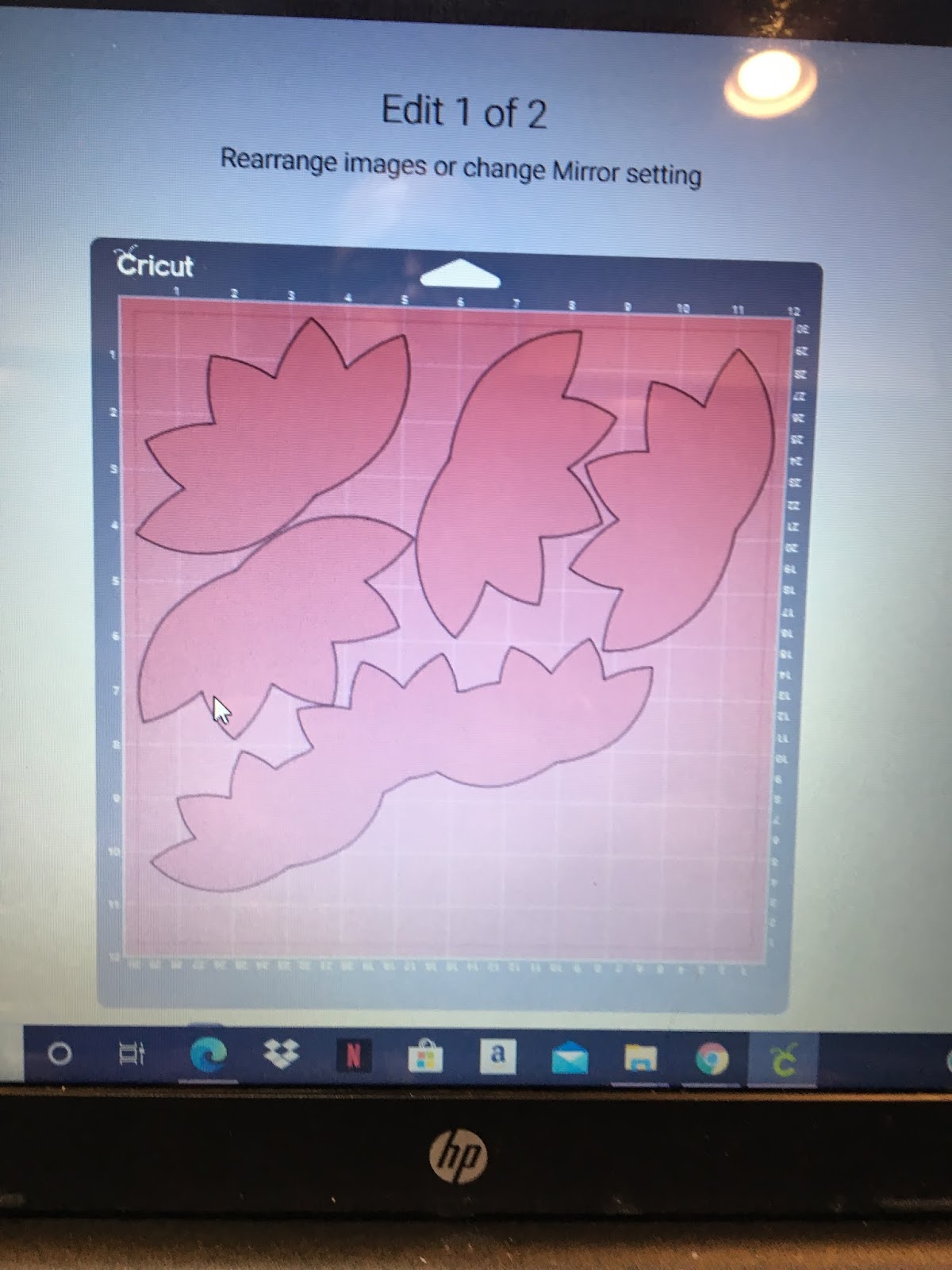
When Cricut lined up the images to be cut, here is what I got.
First of all, design space spread the cuts across 2 sheets of paper with a lot of wasted space. Second of all, the lotus's were not aligned on the paper to cut giving me the colors I had envisioned.  So I moved the cuts.

1) I pulled the images of the 3 welded lotus's for the title to the bottom of the sheet to move it out of the way
2) I pulled one of lotus images up to the top left and rotated toward the left top corner to get the a lot of yellow into the cut
3) I pulled one of lotus images up to the top right and rotated toward the left top corner to get some pink fading into yellow for the cut

4) Next, I had to move the 2 lotus images from mat 4 to mat 3
  • Choose the image on mat 4 
  • Click on Move Object
  • You will be given a choice of mat to move the object to. Choose Mat 3.
  • When the check mark is shown on Mat 3, click the confim button.
  • Cricut will place the image at the top left corner. Move the image so it face the lotus in the right hand top corner, thus placing it to cut with yellow on the left side and pink on the right side.
  • Repeat the steps to move the second 2 lotus images mat 4 to mat 3. This time, place the lotus under the first lotus in the left hand top corner.
Click on Move Object

Choose Mat 3
Confirm choice of mat
After moving to mat place image as required
This is what the image placement on my mat looked like before I cut.
I had my images very close but not overlapping. 
VERY IMPORTANT!! 
1) Make sure that none of your images are touching each other before cutting!
2) Make sure you put the mat in the Cricut with the yellow portion of the paper going in first, or your images will be cut upside down (standing on their heads)
3) Leave enough paper to cut the hibiscus flowers for the Stitch layout

It is also important to make sure you have enough paper in the bottom right to cut the flowers for the Stitch layout.  I put the bottom layer of the hibiscus flowers slong the bottom edge where it is very dark red. I cut the 2 pixie hibiscus flowers from the pink section along the right edge.
Some of you might be asking WHY??

Well, if I had cut the layout using plain cardstock, it would be kind of boring. Using patterned paper for you Cricut cuts amps up the layout to make it more interesting.

My vision realized:

My vision was that all of the lotus pieces would be cut from a single sheet of the Bokek paper as follows:
1) the left most floating lotus - mostly yellow
2) the middle lotus on the left page - some yellow fading into pink
3) the middle lotus on the right page - mostly pink
4) the right most lotus on the right page - some pink fading into yellow
5) the top cluster of lotus - pink so the yellow title shadow would not be lost in the lotus

Check back tomorrow to see the title for the Rivers of Light layout and Friday (Finish it Friday) for the finished layout.

Stay well and Happy crafting!!
And remember all Cricut and general crafting questions are welcome!!
TINA Stanczak
Facebook |     Emptynest   Scrapin   (private group for project instructions)